- Author
- Parham Hatanian
- Original publication
- Medium · Aug 8, 2025
- Local republication
- 2026-10-20T21:54:16.942161Z
If you’re a Flutter developer, you’ve likely used url_launcher to open external apps. While it works for basic URLs, it often falls short for external app deep linking — like opening WhatsApp, Instagram, LinkedIn, or app store pages.
That’s where DeepLinkX comes in. It’s purpose-built for external app deep linking, with type-safe APIs, smart UX decisions, and automatic fallbacks.
🚀 What DeepLinkX Brings to the Table
- Type-safe deep-link actions — no manual URL crafting
- Smart fallback logic — app store or web when app isn’t installed
- Cross-platform support — iOS, Android, MacOS, Windows, Linux and Web.
- Many popular app stores supported — AppStore, PlayStore, Microsoft Store, Huawei AppGallery, Myket Store, Cafe Bazaar, more to come
- Many popular apps supported — WhatsApp, Telegram, Instagram, LinkedIn, Twitter, Slack, YouTube, TikTok, and more
- Installation checks — know before you launch
- Utility methods — redirect to store, open supported apps
🛠 How to Use DeepLinkX
• Open a WhatsApp chat with fallback
import 'package:deeplink_x/deeplink_x.dart';
final deeplinkX = DeeplinkX();
final isLaunched = await deeplinkX.launchAction(
  WhatsApp.chatWithPhone('+1234567890'),
);
• Open Instagram profile with fallback
final isLaunched = await deeplinkX.launchApp(
  Instagram.open(fallBackToStore: true),
);
• Check if LinkedIn is installed
final installed = await deeplinkX.isAppInstalled(LinkedIn());
• Redirect to store page
await deeplinkX.redirectToStore(
  storeActions: [
    AppStore.openAppPage(appId: '389801252'),
    PlayStore.openAppPage(packageName: 'com.example.app'),
  ],
);
⚖ DeepLinkX vs url_launcher
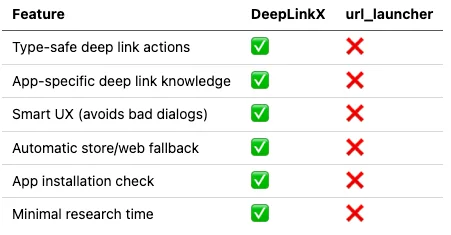
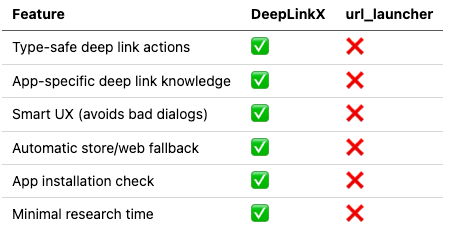
Accessible transcription of the original figure (historical claims):
| Feature | DeepLinkX | url_launcher |
|---|---|---|
| Type-safe deep link actions | ✅ | ❌ |
| App-specific deep link knowledge | ✅ | ❌ |
| Smart UX (avoids bad dialogs) | ✅ | ❌ |
| Automatic store/web fallback | ✅ | ❌ |
| App installation check | ✅ | ❌ |
| Minimal research time | ✅ | ❌ |
💡 Why Developers Love DeepLinkX
- Zero research time — no need to hunt for platform-specific deep link formats
- Best UX automatically — picks the correct method (app link, universal link, intent, scheme) per platform
- Type safety — less chance of runtime errors due to malformed links
- Clean, consistent API — easy to read, maintain, and scale
- Fallback ready — no need to worry about apps isn’t installed or platform errors
📌 Common Use Cases
- Update Prompt — take users straight to the app store to update your app or write an review
- Social Media Links and Contact Us — WhatsApp, Instagram, LinkedIn, Twitter/X
- Business Tools — Slack, Microsoft Teams, Zoom
📥 Install DeepLinkX
In pubspec.yaml:
dependencies:
  deeplink_x: ^latest_version
Import in Dart:
import 'package:deeplink_x/deeplink_x.dart';
✅ Final Thoughts
In Flutter, deep linking to external apps isn’t as simple as opening a URL.
url_launcher treats every link the same — DeepLinkX understands the nuances, delivering the best possible UX without extra work.
🔗 Try DeepLinkX now:
GitHub - DeepLinkX/DeeplinkX: A Flutter plugin for type-safe deeplinking to external apps.