- Author
- Parham Hatanian
- Original publication
- LinkedIn · September 19, 2026
- Local republication
- 2026-10-20T21:54:16.942161Z
A passing test suite is not the same as a publishable package.
A version tag is not proof of review.
And a successful publish is not the whole release experience.
Those distinctions shaped the release automation I built for DeeplinkX, an open-source Flutter plugin I maintain.
The goal was not to create the most sophisticated CI/CD setup possible. It was to make the process repeatable, make its checks explicit, and give developers an easier way to try the package.
The result is six focused GitHub Actions workflows.
But the useful part is not the number of YAML files. It is how the responsibilities are separated—and what each check does not guarantee.
🧭 Start with responsibilities, not one giant pipeline
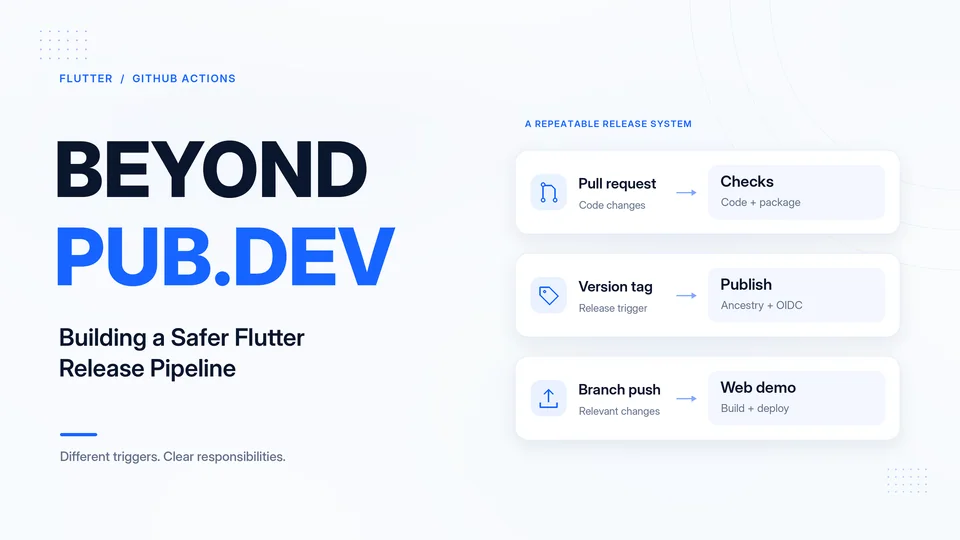
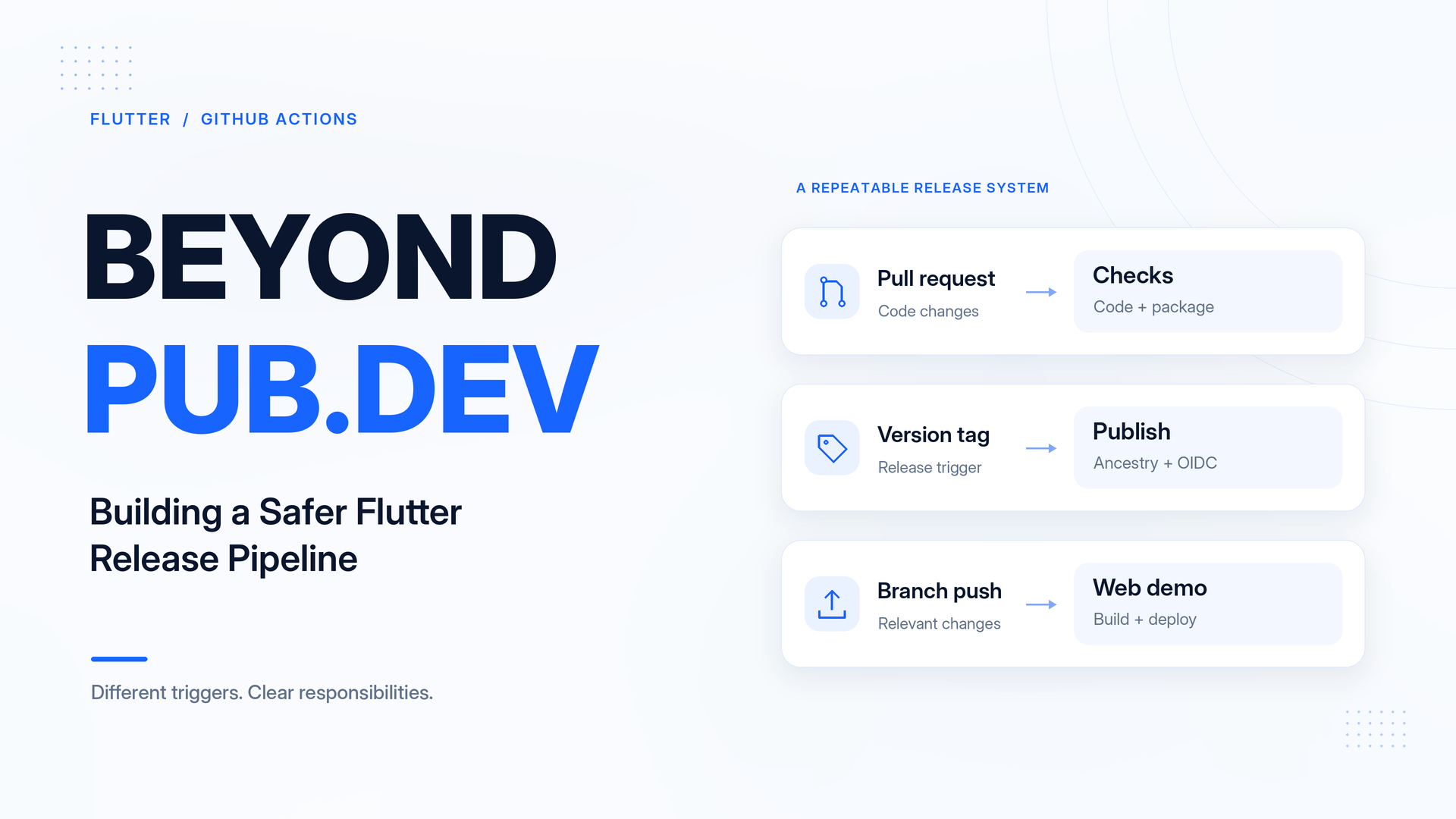
A pull request, a version tag, and a push to the development branch are different events. I do not treat them as interchangeable release triggers.
In this setup, the triggers have distinct responsibilities:
- Relevant pull requests → code-quality and package-readiness checks.
- Version tags → ancestry verification, then pub.dev publishing and signed Android demo builds in separate workflows.
- Relevant pushes to master → web demo updates.
The six workflow files cover code checks, package readiness, a reusable tag-ancestry guard, publishing, web deployment, and Android demo releases.
They are related, but they are not one continuous chain in which every deployment waits for pub.dev publishing.
Separate workflows when their responsibilities, triggers, or permissions genuinely differ.
That is the first design principle I would reuse.
🧪 Passing tests is not package readiness
Code quality
The code-checking workflow runs Dart formatting, Flutter static analysis, and Flutter tests with coverage. It also sends the coverage report to Coveralls.
Package readiness
A separate workflow runs Pana and a publish dry run.
The distinction is practical: tests exercise the behavior covered by the test suite.
Pana analyzes package quality. A publish dry run checks the package without actually publishing it.
I want feedback on both the code and the package that developers will receive. Neither category replaces the other.
There is another boundary worth making explicit: running checks does not automatically make them mandatory for merging.
Required status checks still need to be configured in the repository.
CI reports results. Repository policy decides which results must pass before a merge.
🏷️ A version tag should start verification—not end it
Creating a release tag tells the automation to start. It does not establish that the tagged commit belongs to the intended release history.
Before publishing, the guard resolves the tagged commit and checks whether it is contained in origin/master.
It uses Git ancestry, with full history available, rather than trusting a branch label or the tag's text.
If the commit is outside that history, publishing stops.
This is useful precisely because its responsibility is narrow.
What it answers: Does the tagged commit belong to the intended branch history?
What it does not answer: Was this release reviewed, did all the required tests pass, and is it ready for users?
Those are separate questions for tests, review, and repository protection rules. An ancestry guard should complement them, not create a false sense that they have already happened.
🔐 Use short-lived identity for publishing
For pub.dev publishing, the workflow uses OpenID Connect (OIDC) through Dart's reusable publishing workflow.
With automated publishing configured on pub.dev, this avoids storing a long-lived pub.dev publishing credential in GitHub Secrets.
The setup adds safeguards in three areas:
- Permissions: limit access and scope id-token: write to the publishing job.
- Checkout and dependencies: disable checkout credential persistence and pin third-party actions and the publishing workflow to full commit SHAs.
- Concurrency: control concurrent runs for the same tag.
I see these as separate safeguards, not a single “secure pipeline” checkbox.
The ancestry guard checks the source history. OIDC supplies the publishing identity.
Permissions limit what the job can do. Pinning makes the referenced action revisions explicit.
Important: removing the pub.dev publishing secret does not make the entire release system secret-free.
Signed Android builds still need signing material. That requires its own handling and maintenance.
🌐 Make the release easier to try
A package page helps developers understand a project. A runnable example gives them another way to evaluate it.
Web demo
Relevant pushes to master build the example in release mode with WebAssembly support and deploy it to GitHub Pages.
Developers can open the example without building it locally.
Signed Android APKs
A version tag triggers a different workflow. It checks tag ancestry, runs the example tests, and validates the signing secrets.
It then restores the keystore into temporary runner storage and builds APKs for ARM64, ARMv7, and x86_64.
The workflow verifies each APK's signature with apksigner before attaching the files to a GitHub Release.
These outputs serve different purposes. The browser demo is an easy entry point; the Android APKs let developers try the example on a device without preparing a local build environment.
The separate triggers also matter when interpreting the results: the web demo follows relevant development-branch changes, while the Android artifacts follow a release tag.
I would not describe them as one synchronized release.
✅ The benefits
Clearer responsibilities
A failed package-readiness check, a failed publish job, and a failed demo deployment mean different things.
Keeping those responsibilities distinct gives me a clearer starting point for investigating a failure.
More explicit checks before publishing
Formatting, analysis, tests, package validation, and ancestry verification answer different questions.
The value comes from combining those signals without overstating any one of them.
Less dependence on a permanent publishing credential
OIDC removes the need to keep a long-lived pub.dev credential in the repository's secrets.
It does not remove the need to configure publishing correctly or protect the repository.
A more accessible example
A browser demo and downloadable Android builds offer ways to explore the project without first cloning and building it.
I consider that part of maintaining a package, not just promoting it.
⚖️ The trade-offs
More files still mean more maintenance
Focused workflows can be easier to read individually, but the overall setup has more configuration to maintain.
Flutter versions, caches, permissions, paths, and action references can drift between files.
Reuse can help, although excessive indirection can make a straightforward workflow harder to follow.
Checks consume runner time
Formatting, analysis, tests, package analysis, and builds all have a cost.
This setup uses caching, timeouts, and cancellation of superseded CI runs, but those measures do not make the work free.
I would judge the value against the failures each check is intended to catch—not the number of green badges it produces.
Fresh feedback and reproducibility can conflict
Pana is deliberately activated without a fixed version in this setup.
That allows newer analysis behavior to surface, but it also means results can change as the tool changes.
Pinning would give a more controlled tool version, with the responsibility of keeping it updated. Neither choice eliminates maintenance.
Independent workflows do not create an all-or-nothing release
One consequence of this separation is that a successful package publish does not, by itself, establish that the demo workflows succeeded.
Each output needs its own status. Separation improves clarity, but it does not remove the need to understand the overall release state.
Security controls have limits
OIDC needs initial configuration. Pinned actions still need reviewed updates. The ancestry check needs sufficient Git history. Android signing material still needs protection.
Automation makes these responsibilities explicit; it does not make them disappear.
📌 Copy the boundaries, not the workflow count
I would not tell every Flutter maintainer to create six workflows.
For a smaller package, a simpler setup may be easier to operate.
I would start with the checks and publishing controls the project actually needs, then separate additional responsibilities when their triggers, permissions, or failure handling justify it.
The principle I would keep is this:
A release workflow should make it clear what happened, what was checked, and what remains unproven.
That is why I describe this as a safer release pipeline—not a guarantee of a safe release.
🔗 Explore the implementation
The full implementation is public in the DeeplinkX repository. Explore the workflows, adapt the useful parts, and update the branch names, SDK configuration, permissions, publishing settings, and signing setup for your own project.
👍 If the plugin is useful to you, give it a like on pub.dev. Feedback from using it is welcome, too.
🤝 Connect with me here on LinkedIn to exchange ideas about Flutter, open-source maintenance, and developer tooling.
💬 What part of your package release process still depends on a manual step—and is that intentional?